
📈 Quick Guide to Progress Tasks
Want to track reading pages, savings progress, running distance, or ongoing weight changes? In GoalMap, progress tasks turn abstract goals into visible progress you can follow clearly.
Want a copyable setup? Jump to Step-by-step setup examples for 3 ready-to-use cases: lose weight from
125 jinto120 jin, do120 minutesof cardio per week, and drink1200 mlof water per day.
✨ What are progress tasks?
Progress tasks are best for anything where progress can be recorded with numbers.
Examples:
- 📖 How many pages you have read
- 💰 How much money you have saved
- 🏃 How many kilometers you have run
- ⚖️ What your current weight is
- 🧠 How many words you have memorized
If you have used “quantified tasks” before, you can think of this as the same task type. We now use the name progress tasks because it is more intuitive.
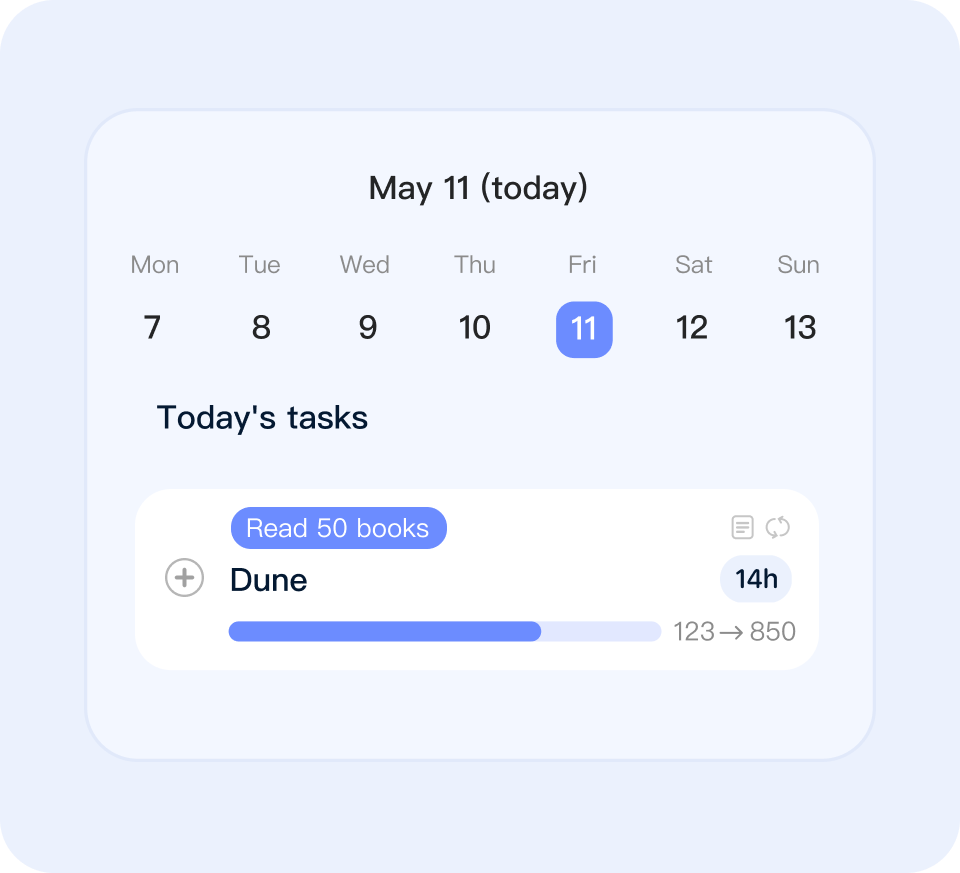
🎯 When should you use a progress task?
If what you care about most is “how much got done,” a progress task is a good fit.
Common use cases:
- Finishing a book
- Saving a certain amount of money
- Tracking weekly exercise volume
- Tracking monthly training sessions
- Recording weight changes
- Accumulating study results
A simple way to decide:
- If you want to track “did I do it,” a regular task is usually better
- If you want to track “how much I did,” a progress task is usually better
🛠️ How do you create a progress task?
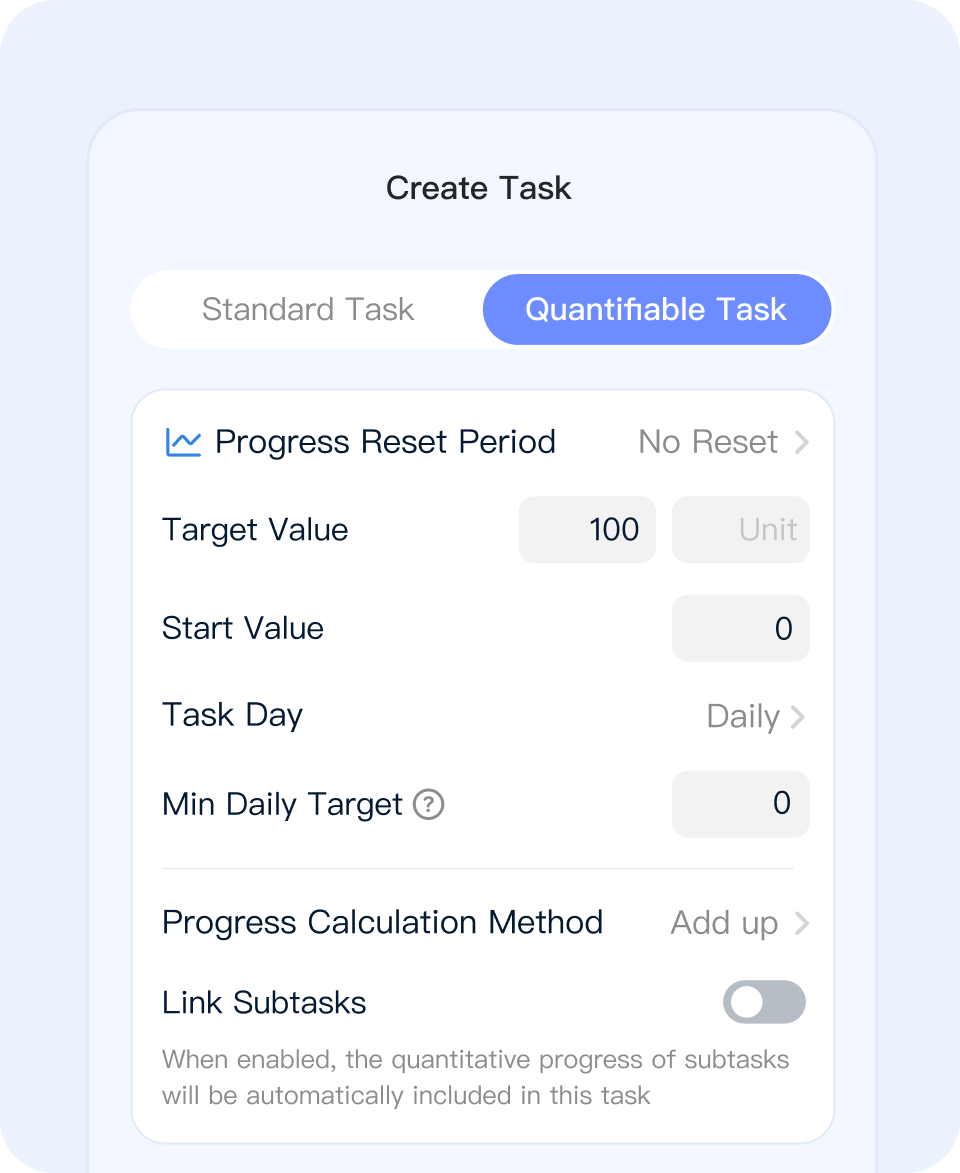
Before creating one, think through these 4 things:
1. Target value
The target value is the number you want to reach.
Examples:
300 pages$5,00020 km12 times
2. Unit
The unit defines what the number means.
Common units:
- pages
- dollars
- kilometers
- times
- items
- kilograms
3. Reset cycle
The reset cycle decides when progress starts counting from zero again.
Common types:
No resetBest for long-term accumulation, such as finishing a book or saving up a sum of moneyDaily resetBest for tasks that should restart every dayWeekly resetBest for weekly goals, such as running 20 km per weekMonthly resetBest for monthly goals, such as completing 12 training sessions per month
4. Task days
Task days decide when the task appears.
For example:
- Every day
- Certain days each week
- Certain days each month
You can think of it like this:
Reset cyclecontrols how progress is countedTask dayscontrol when the task appears
🧭 Step-by-step setup examples
If you want to follow an example directly, here are 3 common setups you can copy.
1. Lose weight from 125 jin to 120 jin
Steps:
Goal details page→Create task→Progress task- Enter the task name, such as
Weight loss: 125 jin to 120 jin - Set
Reset cycle = No reset - Set
Unit = jin - Set
Starting value = 125 - Set
Target value = 120 - Set
Update Mode = Update - Set
Task days = Every day
Why this setup fits:
- Weight is a current value, so
Update progressis better than adding numbers together - Weight loss is a long-term change, so
No resetis the right fit
2. Do 120 minutes of cardio every week
Steps:
Goal details page→Create task→Progress task- Enter the task name, such as
Weekly cardio 120 minutes - Set
Reset cycle = Weekly - Set
Unit = minutes - Set
Target value = 120 - Set
Task days = Every dayif you want to log flexibly, or choose specific weekdays if you already have a workout schedule
Why this setup fits:
- Cardio minutes are accumulated within the week, so
Add to progressis the correct mode - Because the target is weekly, the task should use
Weekly reset
3. Drink 1200 ml of water every day
Steps:
Goal details page→Create task→Progress task- Enter the task name, such as
Drink 1200 ml of water - Set
Reset cycle = Daily - Set
Unit = ml - Set
Target value = 1200 - Set
Task days = Every day
Why this setup fits:
- Water intake is made of multiple small records across the day, so it should be accumulated
- Because the target restarts every day,
Daily resetis the right choice
➕ How do you record progress?
The core of a progress task is simple: keep recording numbers, and the app calculates your current progress.
1. Add to progress
Each new record is added to what you already have.
For example:
- You read
20 pagestoday - You read another
15 pagestomorrow - Your total becomes
35 pages
This works well for most accumulation-based tasks, such as reading, saving money, running, or counting training sessions.
2. Update progress
Some tasks care more about “what is the current value” than “what is the total sum.”
For example, weight:
- Today:
58.2 kg - Tomorrow:
57.8 kg
In that case, update progress is a better fit.
But there is one important rule:
- Only progress tasks with no reset cycle support update progress
- Tasks with
daily / weekly / monthlyreset cycles can only use add to progress
That means:
- Long-term tasks can use either “add” or “update,” depending on the scenario
- Cyclical tasks always record progress by accumulating within the current cycle
✅ How should you understand completion and cycle progress?
There are two common ideas in progress tasks:
1. Overall target completion
When cumulative progress reaches the target value, the task is completed.
For example:
- The target is
300 pages - Your cumulative progress reaches
300 pages - The task is complete
2. Cycle progress
If you set a daily / weekly / monthly reset cycle, the progress bar mainly shows how much you have done in the current cycle.
For example:
- Weekly target:
20 km - Distance run this week:
12 km - What you see now is
12 / 20
When the next cycle begins, this part starts over.
So there are really two layers:
- Long-term, the task is still moving forward
- In the current cycle, you see how much of this round is done
🔗 How does progress contribute to a goal or parent task?
This is one of the most important parts of progress tasks.
1. Task progress still contributes upward
If the task belongs to a goal, or if it is a subtask under another task, its progress still rolls up to the parent level.
2. For cyclical tasks, roll-up uses all historical progress
Even if a task uses a daily / weekly / monthly reset cycle, its contribution to a parent task or goal is still based on the total progress accumulated across all past cycles, not just the current one.
For example:
- Week 1:
18 km - Week 2:
22 km - Week 3:
15 km
The visible weekly progress bar resets each week, but the progress contributed upward still adds together all of those completed amounts.
3. Goal progress is also based on all historical progress
So:
Cycle progressshows how much you have done in this roundRolled-up progressshows how much this task has advanced in total over time
These are not contradictory. They are just two different views.
📊 Where can you view progress and data?
After creating a progress task, you will usually see it in these places:
1. Task card
Good for a quick look at current progress, target value, and progress bar state.
2. Task details page
Good for more complete information, such as current progress, recent records, and execution status.
3. Data charts
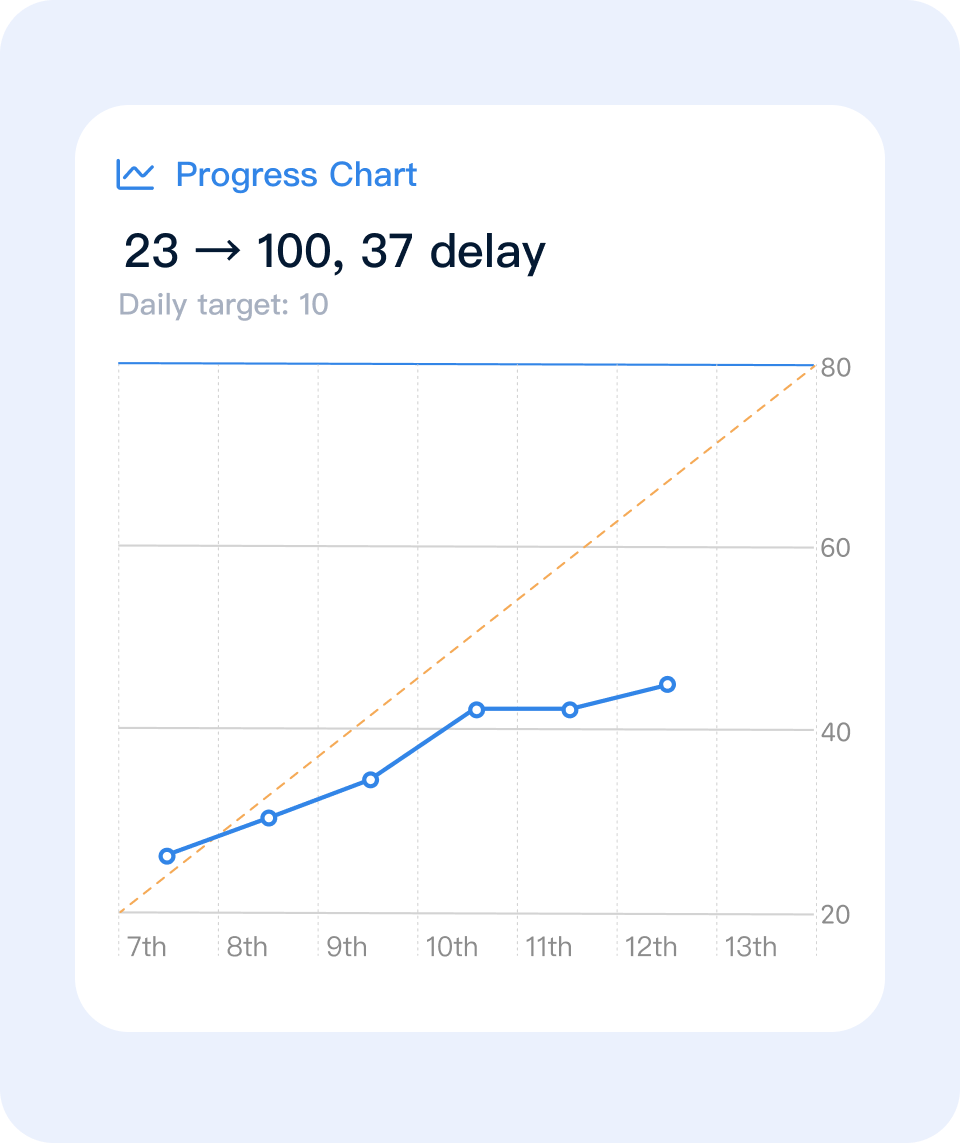
Good for spotting trends, such as whether progress is steady, stalled, or fluctuating.
4. Widgets
Good for putting important progress tasks on your home screen so you can check them anytime.
💡 A few tips
1. Make the target specific
“Read a bit more” is vague. “Finish 300 pages” is much clearer.
2. Use a real unit
If you are tracking pages, use “pages.” If you are tracking distance, use “kilometers.”
3. Do not confuse reset cycle with task days
Remember this line:
Reset cyclecontrols how progress is countedTask dayscontrol when the task appears
4. If you want to track a current state, prefer no reset
For things like weight, balance, or scores, no reset is usually the better choice.
5. If you want rhythm, use cyclical tasks
If you care about things like “did I finish this week” or “how much did I move forward this month,” cyclical tasks are usually the better fit.
🌱 Final note
The value of progress tasks is not just recording numbers. More importantly, they turn vague persistence into visible progress.
If you are just getting started, begin with one simple scenario:
- Finish a book
- Run every week
- Save up a certain amount of money
Start with one task, and make your own progress easier to see.